Configurations
In Experimaestro, a configuration object (Config) is a fundamental concept used to specify parameters and settings for tasks and experiments:
Parameter Definition: The configuration object defines the parameters needed for a task or experiment. These parameters can include data file paths, numerical values, strings, list and dictionaries. Configuration can be nested for more flexibility.
Configuration identifier: Different configurations yield different identifiers. This ensures that each folder name is associated with a unique configuration.
Parameter Validation: A dynamic type checkers ensure configuration values are compatible with their types. The configuration object can include validation rules to ensure that the parameters provided are in the correct format and within expected ranges.
Documentation: The configuration object can include documentation for each parameter, explaining its purpose and how it should be used. This documentation can be output (e.g., experimaestro IR learning configurations).
Flexibility and Extensibility: Configuration objects are designed to be flexible and extensible, allowing users to add new parameters or modify existing ones as the requirements of the task evolve. In particular, default values can be introduced.
Configuration identifiers
A configuration identifier in the context of systems like Experimaestro is a unique identifier associated with a specific configuration object. This identifier plays a crucial role in managing and referencing configurations, especially in complex systems where multiple configurations are used. Here’s a detailed description:
Uniqueness: A configuration identifier (MD5 hash) is unique for each set of distinct experimental parameters.
Run-Once Guarantee: The unique identifiers ensure that each task is executed only once. This is particularly important in avoiding redundant computations and ensuring the efficiency of the workflow.
Defining a configuration
A configuration is defined whenever an object derives from Config.
When an identifier is not given, it is computed as __module__.__qualname__. In that case,
it is possible to shorten the definition using the Config class as a base class.
defines a configuration with name my.model and one argument gamma that has the type float.
__xpmid__ can also be a class method to generate dynamic ids for all descendant configurations
When __xpmid__ is missing, the qualified name is used.
Object hierarchy
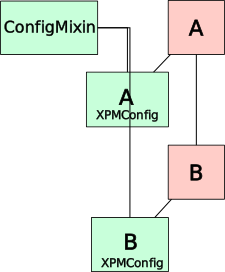
When deriving B from Config, experimaestro creates a configuration
object A.XPMConfig from ConfigMixin and A. When calling the
configuration constructor A.C(...) or (B.C(...)), the returned object is of
type A.XPMConfig or B.XPMConfig, which extends the original object with a
configuration specific behavior.
Composition operator
The @ operator provides a concise syntax for composing configurations. When
a configuration has a parameter that accepts another configuration type, you
can use @ instead of explicitly naming the parameter.
Basic composition
The operator finds the unique parameter in the outer configuration that can
accept the inner configuration’s type. If there are multiple matching
parameters or none, a ValueError is raised.
Chaining compositions
When chaining multiple @ operations, each configuration is added to the
same outer configuration (left-associative behavior):
For nested structures, use parentheses to compose from inside out:
Ambiguity and errors
The composition operator raises ValueError in two cases:
No matching parameter: The outer configuration has no parameter that accepts the inner type
Ambiguous: Multiple parameters can accept the inner type
Deprecating a configuration or attributes
When a configuration is moved (or equivalently its __xpmid__ changed), its signature
changes, and thus the same tasks can be run twice. To avoid this, use the deprecate()
decorator.
Simple deprecation (legacy pattern)
For simple cases where the old and new configurations have the same parameters, use
deprecate() with inheritance:
Example
from experimaestro import Param, Config, deprecate

class NewConfiguration(Config):
    pass

@deprecate
class OldConfiguration(NewConfiguration):
    # Only pass is allowed here
    pass
Deprecation with conversion
For cases where the deprecated configuration has different parameters and needs to
be converted to the new format, use @deprecate(TargetConfig) with a __convert__
method:
Example
from experimaestro import Param, Config, deprecate

class NewConfig(Config):
    """New configuration with a list of values."""
    values: Param[list[int]]

@deprecate(NewConfig)
class OldConfig(Config):
    """Old configuration with a single value."""
    value: Param[int]

    def __convert__(self):
        # Convert old single value to new list format
        return NewConfig(values=[self.value])
The __convert__ method should return an equivalent instance of the target
configuration. The identifier is computed from the converted configuration,
ensuring that equivalent old and new configurations produce the same job
identifier.
This also supports chained deprecation for multiple version migrations:
Immediate replacement with replace=True
In some cases, you want the deprecated configuration to be immediately replaced
by the new one during creation. Use replace=True for this behavior:
Example
from experimaestro import Param, Config, deprecate

class NewConfig(Config):
    values: Param[list[int]]

@deprecate(NewConfig, replace=True)
class OldConfig(Config):
    value: Param[int]

    def __convert__(self):
        return NewConfig(values=[self.value])

# Creating OldConfig actually returns a NewConfig instance
result = OldConfig.C(value=42)
print(type(result).__name__)  # "NewConfig.XPMConfig"
print(result.values)          # [42]
With replace=True:
Creating the deprecated configuration immediately calls
__convert__and returns the new configuration typeThe original deprecated identifier is still preserved for
fix_deprecatedtool to create symlinks between old and new job directoriesIf code tries to set an attribute that existed on the deprecated config but not on the new one, a warning is logged and the value is discarded
Deprecating a parameter
It is possible to deprecate a parameter or option:
Example
from typing import List
from experimaestro import Param, Config, deprecate

class Learning(Config):
    losses: Param[List[Loss]] = []

    @deprecate
    def loss(self, value):
        # Checking that the new param is not used
        assert len(self.losses) == 0
        # We allow several losses to be defined now
        self.losses.append(value)
Warning the signature will change when deprecating attributes
To fix the identifiers, one can use the deprecated command. This
will create symbolic links so that old jobs are preserved and
re-used.
experimaestro deprecated list WORKDIR
Object life cycle
Initialisation
During task execution, the objects are constructed following these steps:
The object is constructed using
self.__init__()The attributes are set (e.g.
gammain the example above)self.__post_init__()is called (if the method exists)Pre-tasks are ran (if any, see below)
Sometimes, it is necessary to postpone a part of the initialization of a configuration
object because it depends on an external processing. In this case, the initializer() decorator can
be used:
from experimaestro import Config, initializer

class MyConfig(Config):
    # The decorator ensures the initializer can only be called once
    @initializer
    def initialize(self):
        # Do whatever is needed
        pass
Types
Possible types are:
basic Python types (
str,int,float,bool) and pathspathlib.Pathlists, using
list[T]sets, using
set[T](see Sets below)enumerations, using
Enumfrom theenumpackagedictionaries (support for basic types in keys only) with
dict[U, V]Other configurations
Sets
Sets (set[T]) are supported as parameter types. Since sets are unordered,
experimaestro sorts elements deterministically before computing the identifier,
ensuring that {A, B} and {B, A} always produce the same identifier.
For primitive types (int, str, float, enum), sets work directly:
For Config objects, elements must be sealed before being placed in a set,
because Config objects are only hashable once their identifier has been computed
and cached. Use sealed_set() to seal and collect elements
in one step:
from experimaestro import Config, Param, sealed_set

class Model(Config):
    lr: Param[float]

class Ensemble(Config):
    models: Param[set[Model]]

m1 = Model.C(lr=0.01)
m2 = Model.C(lr=0.02)

# sealed_set seals each Config element and returns a set
ensemble = Ensemble.C(models=sealed_set(m1, m2))
Alternatively, you can seal configs individually with seal():
m1 = Model.C(lr=0.01).seal()
m2 = Model.C(lr=0.02).seal()
ensemble = Ensemble.C(models={m1, m2})
Warning
Attempting to put an unsealed Config object in a set[T] parameter will raise
a TypeError. Always use sealed_set() or call .seal() on each element first.
Parameters
from experimaestro import Config, Param, field

class MyConfig(Config):
    """My configuration

    Long description of the configuration.

    Attributes:
        x: The parameter x
        y: The parameter y
    """
    # Default value ignored in identifier computation (backwards-compatible behavior)
    # If value == 1, it won't be included in identifier
    x: Param[int] = field(default=1, ignore_default=True)

    # Default value always included in identifier computation
    # Even if value == 1, it will be included in identifier
    w: Param[int] = field(default=1)

    # Factory default always included in identifier
    v: Param[SomeConfig] = field(default_factory=SomeConfig.C)

    # Factory default ignored when value == default
    u: Param[SomeConfig] = field(default_factory=SomeConfig.C, ignore_default=True)

    # Without default value
    y: Param[type]

    # Using a docstring
    z: Param[int]
    """Most important parameter of the model"""
namedefines the name of the argument, which can be retrieved by the instanceself(class) or passed as an argument (function)typeis the type of the argument (more details below)Default values can be specified using
field:field(default=value): The default isvalue, always included in the signature computation.field(default=value, ignore_default=True): The default isvalue, and if the actual value equals the default, it won’t be included in the signature computation. This allows adding new parameters without changing past experiment signatures.field(default_factory=callable): A callable that produces the default value, always included in the signature computation (likedefault).field(default_factory=callable, ignore_default=True): Factory default excluded from identifier when value equals the default.
Warning
Bare default values are deprecated
Using bare default values like x: Param[int] = 23 is deprecated. This syntax is
ambiguous because it’s unclear whether the default should be ignored in identifier
computation or not.
Use field(default=23, ignore_default=True) to keep the backwards-compatible behavior
(default ignored in identifier) or field(default=23) to always include the value in
identifier.
Run experimaestro refactor default-values to automatically convert bare defaults.
Warning
field(ignore_default=<value>) syntax is deprecated
The old syntax field(ignore_default=23) (passing a value directly) is deprecated.
Use field(default=23, ignore_default=True) instead. The old syntax still works
but will emit a DeprecationWarning.
Default Values
Warning
When changing an ignore_default value, the identifier of configurations
might change. The reason is explained below.
Adding a new parameter to a Config with field(default=..., ignore_default=True) will not change the original id.
Why? The motivation is that with this behavior, you can add experimental parameters that were previously hard-coded.
For instance, if the original class is:
Then when using field(default=..., ignore_default=True) for parameter b will yield an object with the
same identifier when using the default value:
from experimaestro import Config, Param, field

class MyConfig(Config):
    a: Param[int]
    b: Param[int] = field(default=4, ignore_default=True)


# When not setting `b`, the identifier is the same
obj = MyConfig.C(a = 2)
new_id = obj.__identifier__()
assert new_id == old_id

# When setting `b` to the default value, still the same
obj = MyConfig.C(a = 2, b = 4)
new_id = obj.__identifier__()
assert new_id == old_id
Warning
The identifier can be different if only the ignore_default value is changed. In particular, if the default value is 2 (and not 4)
field(default=…) vs field(default=…, ignore_default=True)
The key difference between field(default=...) and field(default=..., ignore_default=True):
Feature |
|
|
|---|---|---|
Default value |
X |
X |
Included in identifier when value==X |
Yes |
No |
Use case |
When you want the default value to be part of the task signature |
When adding new parameters to existing configs without breaking old identifiers |
The same applies to default_factory:
Feature |
|
|
|---|---|---|
Default value |
F() |
F() |
Included in identifier when value==F() |
Yes |
No |
from experimaestro import Config, Param, field

class ConfigA(Config):
    x: Param[int] = field(default=1)      # Always in identifier

class ConfigB(Config):
    x: Param[int] = field(default=1, ignore_default=True)  # Ignored if x==1

# These will have DIFFERENT identifiers
a = ConfigA.C(x=1)
b = ConfigB.C(x=1)
assert a.__identifier__() != b.__identifier__()

# But these will have the SAME identifier
a2 = ConfigA.C(x=2)
b2 = ConfigB.C(x=2)
# Both include x=2 in their identifiers (since 2 != default value)
Overriding parameters
When a subclass redefines a parameter from a parent class, experimaestro issues
a warning to alert you about the potential unintended override. To intentionally
override a parent parameter, use field(overrides=True):
from experimaestro import Param, Config, field

class Parent(Config):
    value: Param[int]

class Child(Parent):
    # This will produce a warning about overriding 'value'
    value: Param[int]

class ChildWithOverride(Parent):
    # This explicitly marks the override as intentional - no warning
    value: Param[int] = field(overrides=True)
Type compatibility
When overriding a parameter, the new type must be compatible with the parent type:
For Config types: The child type must be a subtype of the parent type (covariant)
For primitive types: The types must match exactly
from experimaestro import Param, Config, field

class BaseModel(Config):
    pass

class AdvancedModel(BaseModel):
    pass

class Parent(Config):
    model: Param[BaseModel]

# OK - AdvancedModel is a subtype of BaseModel
class Child(Parent):
    model: Param[AdvancedModel] = field(overrides=True)

# ERROR - str is not compatible with int (raises TypeError)
class BadChild(Parent):
    value: Param[str] = field(overrides=True)
Constants
Constants (Constant) are special parameters that cannot be modified. They are useful to note that the
behavior of a configuration/task has changed, and thus that the signature should not be the
same (as the result of the processing will differ).
Metadata
Metadata are parameters which are ignored during the signature computation. For
instance, the human readable name of a model would be a metadata. They are
declared as parameters, but using the Meta type hint.
Example
It is also possible to dynamically change the type of an argument using the setmeta() function:
Path option
It is possible to define special options that will be set
to paths relative to the task directory using PathGenerator. For instance,
defines the instance variable path as a path .../output.txt within the task
directory. To ensure there are no conflicts, paths are defined by following the
config/task path, i.e. if the executed task has a parameter model, model has
a parameter optimization, and optimization a path parameter loss.txt, then
the file will be ./out/model/optimization/loss.txt.
Partial Identifiers
Sometimes you want to share directories (like checkpoints) across tasks that differ only in certain parameters. For example, when training a model with different numbers of iterations but the same learning rate, you might want all runs to share the same checkpoint directory.
Partial identifiers (using partial() and param_group()) allow you to define parameter subsets that compute partial
identifiers by excluding certain parameter groups. This enables:
Sharing checkpoint directories across training runs with different iteration counts
Resuming training from checkpoints saved by different configurations
Organizing experiment outputs by logical parameter groups
Defining Parameter Groups
First, define parameter groups at module level:
from experimaestro import param_group

# Create parameter groups
iter_group = param_group("iter")
model_group = param_group("model")
Using Partial Identifiers in Tasks
Define partial identifiers as class attributes and assign parameters to groups:
from experimaestro import Task, Param, Meta, field, PathGenerator, partial, param_group
from pathlib import Path

iter_group = param_group("iter")

class Learn(Task):
    # Define a partial identifier that excludes iteration-related parameters
    checkpoints = partial(exclude_groups=[iter_group])

    # This parameter is in the iter group - excluded from partial identifier
    max_iter: Param[int] = field(groups=[iter_group])

    # This parameter has no group - included in partial identifier
    learning_rate: Param[float]

    # Path generated using the partial identifier
    checkpoints_path: Meta[Path] = field(
        default_factory=PathGenerator("checkpoints", partial=checkpoints)
    )

    def execute(self):
        # self.checkpoints_path will be in:
        # WORKSPACE/partials/TASK_ID/checkpoints/PARTIAL_ID/checkpoints/
        save_checkpoint(self.checkpoints_path / "model.pt")
How Partial Identifiers Work
Tasks with the same values for non-excluded parameters will have the same partial identifier
Tasks can have different values for excluded parameters and still share the same partial directory
# (Assuming Learn is defined as above)

# These have different full identifiers but the SAME partial identifier
task1 = Learn.C(max_iter=100, learning_rate=0.1)
task2 = Learn.C(max_iter=200, learning_rate=0.1)

# This has a DIFFERENT partial identifier (learning_rate differs)
task3 = Learn.C(max_iter=100, learning_rate=0.2)
Partial Identifier Options
The partial() function supports several options:
Option |
Description |
|---|---|
|
List of parameter groups to exclude from partial identifier |
|
List of groups to always include (overrides exclusion) |
|
If True, exclude all parameters by default |
|
If True, exclude parameters with no group assigned |
from experimaestro import partial, param_group

iter_group = param_group("iter")
model_group = param_group("model")

# Exclude specific groups
checkpoints = partial(exclude_groups=[iter_group])

# Include only specific groups (exclude everything else)
model_params = partial(exclude_all=True, include_groups=[model_group])

# Exclude ungrouped parameters
grouped_only = partial(exclude_no_group=True)
Parameters in Multiple Groups
A parameter can belong to multiple groups:
from experimaestro import Task, Param, field, partial, param_group

iter_group = param_group("iter")
model_group = param_group("model")

class MyTask(Task):
    checkpoints = partial(exclude_groups=[iter_group])

    # This parameter is in both groups
    x: Param[int] = field(groups=[iter_group, model_group])
If any of a parameter’s groups is excluded, the parameter is excluded
from the partial identifier (unless overridden by include_groups).
Validation
If a configuration has a __validate__ method, it is called to validate
the values before a task is submitted. This allows to fail fast when parameters
are not valid.
Value classes
By default, the configuration class itself is used to create instances. However, you may want to use a different class for the runtime instance, especially when:
You want to avoid importing heavy dependencies (like PyTorch) during configuration
The runtime class needs to inherit from external classes (like
nn.Module)You want to separate configuration logic from implementation logic
The @Config.value_class() decorator allows registering an external value class:
from experimaestro import Config, Param

class Model(Config):
    hidden_size: Param[int]
    num_layers: Param[int] = 3

@Model.value_class()
class TorchModel(Model):
    """The actual PyTorch implementation"""

    def __post_init__(self):
        import torch.nn as nn
        # Now we can safely import PyTorch
        self.layers = nn.ModuleList([
            nn.Linear(self.hidden_size, self.hidden_size)
            for _ in range(self.num_layers)
        ])

    def forward(self, x):
        for layer in self.layers:
            x = layer(x)
        return x
Value class requirements
The value class must:
Be a subclass of the configuration class: This ensures type compatibility
Inherit from parent value classes: If the parent configuration has a value class, the child value class must inherit from it
from experimaestro import Config, Param

class BaseModel(Config):
    base_param: Param[int]

@BaseModel.value_class()
class BaseModelImpl(BaseModel):
    def base_method(self):
        return self.base_param * 2

class ChildModel(BaseModel):
    child_param: Param[int]

# Must inherit from BOTH ChildModel AND BaseModelImpl
@ChildModel.value_class()
class ChildModelImpl(ChildModel, BaseModelImpl):
    def child_method(self):
        return self.base_method() + self.child_param
Accessing the value class
You can access the value class through the XPMValue property:
# (Assuming Model is defined as above)

# Returns TorchModel if registered, or Model itself otherwise
Model.XPMValue

# Creating instances uses the value class automatically
config = Model.C(hidden_size=256)
instance = config.instance()  # Returns a TorchModel instance
Skipping intermediate classes
If an intermediate class in the hierarchy doesn’t have a value class, child classes can still define their own:
from experimaestro import Config, Param

class Base(Config):
    x: Param[int]

@Base.value_class()
class BaseImpl(Base):
    pass

class Middle(Base):  # No value class defined
    y: Param[int]

class Leaf(Middle):
    z: Param[int]

# LeafImpl must inherit from BaseImpl (skipping Middle which has no impl)
@Leaf.value_class()
class LeafImpl(Leaf, BaseImpl):
    pass
Accessing configuration from instances
When a configuration is instantiated (via config.instance()), it is often
useful to access the original configuration object from the resulting instance.
This is made possible by the xpmconfig property.
By default, config.instance() tracks the original configuration. This
behavior can be controlled with the keep parameter (which defaults to True).
config = MyModel.C(gamma=0.1)
instance = config.instance()

# Access the original configuration
assert instance.xpmconfig is config
Recursive tracking
Configuration tracking is recursive. If a configuration contains other
configuration objects as parameters, those sub-configurations are also
instantiated, and their instances will also have their xpmconfig property
set to the corresponding original sub-configuration.
sub_config = SubModel.C(x=1)
main_config = MainModel.C(sub=sub_config)
instance = main_config.instance()

# Recursive tracking
assert instance.sub.xpmconfig is sub_config
Unified API
The xpmconfig property is available on both configuration objects and
their instances. When called on a configuration object, it returns
the object itself. This allows configuration and instances to be used
interchangeably in many contexts.
def process(obj):
    # Works whether obj is a Config or an instantiated value
    config = obj.xpmconfig
    print(f"Processing with config: {config}")
Instance-based configurations
By default, two Config instances with identical parameters will have the same identifier. This is the desired behavior in most cases, as it ensures task deduplication and caching. However, in some scenarios, you need to distinguish between different instances even when their parameters are identical.
This is where InstanceConfig comes in. When a class derives from InstanceConfig instead of Config, each instance will have a unique identifier based on the order it appears during identifier computation.
When to use InstanceConfig
Use InstanceConfig when:
Shared vs. Separate Resources: You need to distinguish between shared and separate instances of the same configuration (e.g., shared model weights vs. separate model instances)
Multiple Identical Configurations: The same configuration appears multiple times in a workflow, and each occurrence should be treated as distinct
Shared vs Separate Model Instances
from experimaestro import Param, Config, InstanceConfig

class SubModel(InstanceConfig):  # Use InstanceConfig instead of Config
    """A model component that can be shared or separate"""
    hidden_size: Param[int] = 128

class Ensemble(Config):
    """An ensemble using multiple models"""
    model1: Param[SubModel]
    model2: Param[SubModel]

# Create two instances with identical parameters
sm1 = SubModel.C(hidden_size=128)
sm2 = SubModel.C(hidden_size=128)

# Case 1: Shared instance - the same SubModel is used for both parameters
# This means model1 and model2 share weights/state
shared_ensemble = Ensemble.C(model1=sm1, model2=sm1)

# Case 2: Separate instances - different SubModel instances for each parameter
# This means model1 and model2 have independent weights/state
separate_ensemble = Ensemble.C(model1=sm1, model2=sm2)

# The Ensemble configurations will have DIFFERENT identifiers
# Even though both use SubModel instances with hidden_size=128
assert shared_ensemble.__identifier__() != separate_ensemble.__identifier__()

# This distinction is important: with regular Config, both would have
# the same identifier since the parameters are identical. With InstanceConfig,
# the framework can distinguish between shared and separate instances.
Backwards compatibility
InstanceConfig is designed to be backwards compatible with existing experiments. The first occurrence of an InstanceConfig instance (with a given set of parameters) will have the same identifier as a regular Config would have. Only when a second instance with identical parameters is encountered does the instance order marker get added to the identifier.
This means you can migrate existing configurations to InstanceConfig without invalidating previous experiments, as long as you were only using a single instance of each configuration.
Warning
Be careful when migrating to InstanceConfig if your workflow previously created multiple instances with the same parameters. The identifiers will change for the second and subsequent instances.
How it works
During identifier computation, Experimaestro tracks InstanceConfig instances by their base identifier (computed from parameters). When the same base identifier is encountered multiple times (but with different Python object instances), each occurrence after the first gets a unique instance order marker added to its identifier.
The instance order is deterministic and based on the traversal order during identifier computation, ensuring reproducibility across runs.
Prepare configurations (data preparation)
A Prepare is a Config that declares an in-process
preparation step — typically downloading a dataset, fetching credentials, or
populating a local cache — that should run before any task that depends on
it. Library authors return a Prepare instance from helper functions like
prepare_dataset(...); experimaestro discovers them automatically in any
submitted task’s parameters and invokes prepare() exactly once per
identifier, in the driver Python process.
from experimaestro import Prepare, Task, Param

class DatasetPrep(Prepare):
    name: Param[str]

    def prepare(self) -> None:
        # Idempotent: the underlying tool should no-op if the cache is warm.
        actually_fetch_huggingface(self.name)

class Train(Task):
    dataset: Param[DatasetPrep]

    def execute(self):
        ...

# Submitting the task auto-attaches a dependency on the Prepare:
Train.C(dataset=DatasetPrep.C(name="hf:foo")).submit()
Key properties:
No on-disk footprint. A
Prepareis aResource, not aJob: there is no workdir underjobs/, no.donemarker, noparams.json. Idempotence is the responsibility ofprepare()itself.Dedup by identifier. Two
Prepareinstances with the same parameters share a single execution. Many tasks referencing the same Prepare trigger at most oneprepare()call per Python process.Concurrent. Distinct Prepares run in parallel — each task starts as soon as its prepares have completed.
RunMode.PREPARE. Setting--run-mode prepareonexperimaestro run-experimentruns every discoveredPreparereferenced by submitted tasks while skipping the tasks themselves. This is useful to pre-warm a cache before submitting jobs to an offline cluster.
# Pre-warm all downloads referenced by the experiment, then run tasks
# (the second invocation can be offline).
experimaestro run-experiment --run-mode prepare my_experiment.py
experimaestro run-experiment my_experiment.py
Where do results land in each run mode?
Run mode |
|
Cache populated by |
|---|---|---|
|
One folder per task (logs, outputs, |
Yes (prep runs before each task) |
|
Nothing |
Yes (only effect on disk) |
|
|
No |
|
Nothing |
No |
The cache location is owned by whatever prepare() calls — usually
~/.cache/datamaestro/ for datasets resolved via
datamaestro, or
~/.cache/huggingface/ for direct HF Hub downloads. Experimaestro itself
writes nothing for a Prepare.
Prepare.prepare() runs in the driver process via asyncio.to_thread, so
blocking I/O does not stall the scheduler loop.
See also: How do I pre-download datasets or resources before running on an offline cluster? in the FAQ; the MNIST demo exercises the end-to-end flow.
How is a configuration identifier computed?
The principale is the following. Any value can be associated with a unique byte
string: the byte string is obtained by outputting the type of the value (e.g.
string, ir.adhoc.dataset) and the value itself as a binary string. A special
handling of configurations and tasks (objects) is performed by sorting keys in
ascending lexicographic order, thus ensuring the uniqueness of the
representation.
Moreover:
Ignored default values are removed when the value matches the default (e.g.
k1when set to 0.9 withfield(default=0.9, ignore_default=True)). This allows to handle the situation where one adds a new experimental parameter (e.g. a new loss component). In that case, usingfield(default=..., ignore_default=True)allows to add this parameter without invalidating all the previously ran experiments.Regular default values using
field(default=...)are always included in the identifier computation, even when the value matches the default.Ignored values are removed (e.g. the number of threads when indexing, the path where the index is stored)